AI · Agentic Systems
From ChatGPT to agents: what you need to understand to get started today
Models, providers, APIs, subscriptions and harnesses can make getting started with agents look more complicated than it really is. This is the map I wish I had when I started experimenting with them.
ChatGPT hardly needs an introduction anymore. A huge number of people have at least once typed a question into a text box, waited a few seconds and received an answer. Some use it every day for work. Others still see it as a kind of glorified Google that simply writes longer text.
The jump starts to feel much larger once you move beyond that chat. Suddenly you see someone open a terminal, launch Codex, Claude Code or OpenCode, ask it to review an entire project, and let the model read files, run commands, search documentation, modify code, execute tests and recover from its own mistakes. Keep going down the rabbit hole and you run into models, providers, APIs, tokens, context windows, MCP, skills, plugins, subagents, routers, local models, quantization and a lot of people arguing about which piece is best. From the outside, getting started with agents can look far more complicated than it needs to be.
I got into this space by trying one thing after another, and for quite a while I mixed together concepts that now feel clearly different. I would try one model because someone said it was better, then another harness, then an API, OpenRouter and eventually local models. Over time I understood why two people can say they are using “the same model” and still have very different experiences: the model is only one part of the system around it.
This article is my attempt to organise that map for someone who already knows ChatGPT and wants to start using agents. I want to explain the pieces that took me a while to separate, how they fit together, and what I would try today if I were starting again without first learning transformer internals, building my own infrastructure or chasing every new model release.
From talking to a chatbot to giving work to an agent
A chat interface can already do quite a lot. You can upload a document and ask for a summary, pass it a screenshot and ask it to interpret it, discuss an idea for an hour, or paste code and ask it to look for a bug. Current products have also added web search, code execution, file analysis and other tools, so the line between “chat” and “agent” is not completely rigid.
The practical difference becomes clearer when we want the model to work on an environment rather than only on what we can put into the conversation.
Imagine a fairly boring task: I have a folder with hundreds of messy files and I want to classify them according to a set of rules, rename the ones that do not follow a convention, and generate a small report at the end with the changes.
With a chatbot, I could explain the problem, upload a few examples and ask it to write me a script. Then I would have to copy it, run it, discover that it did not account for one of the cases, go back to the chat, paste the error and repeat the process.
With an agent that has access to that folder and a terminal, I can describe the outcome I want and let it first inspect what is actually there. It can list the files, detect patterns, propose a strategy, write the script, execute it, check the result and correct it if something goes wrong.
The intelligence can come from exactly the same model. What has changed is the environment in which we are using it.
The same is true in development. Asking a chat “why is this function failing?” and pasting 50 lines of code is very different from giving the agent access to a repository and asking it to locate the source of a bug. In the second case it may discover that the function we are looking at is not even the real problem, follow a reference into another module, review the existing tests, run the application and validate the change.
The image of an “agent” as a fully autonomous entity working for days while we sleep makes the idea sound more exotic than it needs to be. A useful starting point is simply a model inside a loop with access to tools:
receive context → decide what to do → use a tool → observe the result → decide again.
That loop might last two steps or two hundred iterations. What changes in practice is how much the model can observe, which actions it can take, and how the results of those actions feed into the next decision.
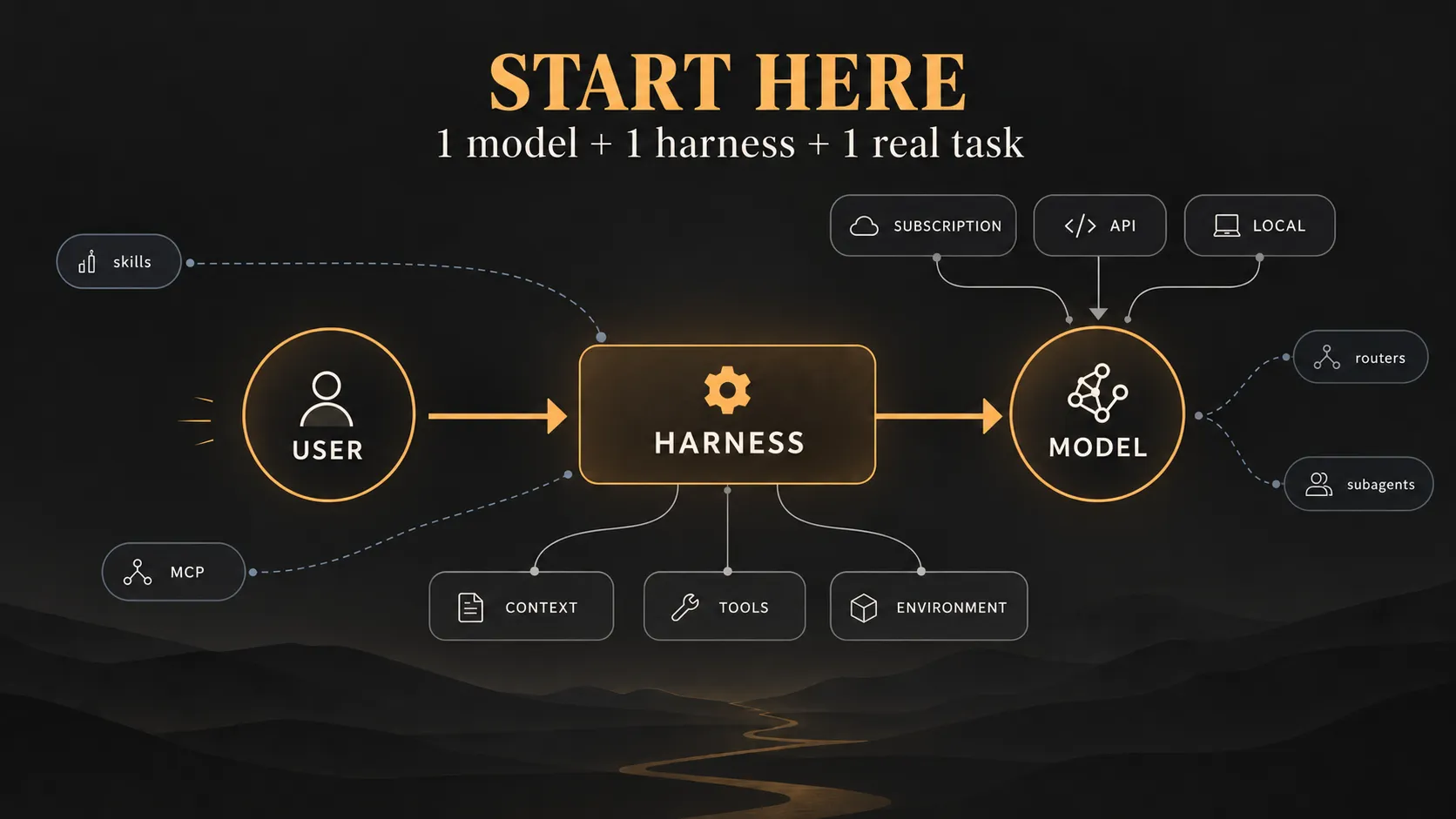
Model, provider, harness and environment
A lot of the confusion starts here because products such as ChatGPT hide most of these layers. You open the application, maybe select a model, and start typing. With more open tools, those pieces stop arriving as one package and it helps to separate them mentally.
The simplified map I wish I had at the beginning is this:
model → provider → harness → tools and environment
It is deliberately simple. The point is to keep the responsibilities clear, not to define a universal architecture for AI systems.
The model
GPT, Claude, Gemini, Qwen, DeepSeek, Kimi or GLM are model families.
We could spend hours talking about parameters, training, reasoning, context or benchmarks, but you do not need that to get started. What matters here is that the model is the component that receives the context we have prepared for it and generates the next output: a response to us, code, structured data or an indication that it wants to use a tool.
In practical terms, there is a rough distinction that is useful for beginners, even if it is a simplification.
On one side there are the large proprietary or frontier models from companies such as OpenAI, Anthropic or Google. These are usually the models we first see integrated into major commercial products, and the ones competing for top spots in many benchmarks.
On the other side there is a huge ecosystem of open-weight models. In recent years, a lot of the most interesting activity in this second group has come from Asian labs: Qwen, DeepSeek, Kimi, GLM, MiniMax and many others.
I use that distinction as orientation, not as a quality ranking. One of the things that changed most for me after trying different models was realising that, for learning, experimentation and even a lot of real work, you do not always need the most powerful model available that week.
A cheaper and faster model may fit repetitive tasks better; another may follow instructions in a way that suits your workflow. Some open models are already capable enough to use tools, write code and sustain fairly long agentic sessions. For a first setup, choosing something good enough and actually working with it is usually more useful than staying stuck in the search for “the best model”.
The provider
This is another distinction that can go unnoticed at first.
The company that creates a model and the company that runs that model for you do not have to be the same.
If you consume the OpenAI API directly in order to use a GPT model, developer and provider are the same. But there are models that may be deployed simultaneously by many different companies.
This creates an interesting situation: the same model can feel different depending on who is serving it. The underlying capability remains the same, but hardware, configuration, speed, availability, limits, feature support, caching, region and price all shape the experience around it.
OpenRouter makes this especially visible. It aggregates hundreds of models and many providers behind a common API, and for many endpoints it exposes measurements such as time to first token, throughput and uptime. Its router can also select providers according to criteria such as price, speed or reliability.
This is one of those details that seems irrelevant until you start using APIs heavily. Two endpoints serving the same model can give you a noticeably different experience.
The harness
This is probably the piece I paid the least attention to at the beginning, and one of the ones I value most now.
Codex, Claude Code and OpenCode are all examples of harnesses.
The term harness is used somewhat flexibly. The definition that is most useful to me is simple: it is the software layer that puts the model to work.
A model on its own generates an output. In order to inspect our filesystem, run git diff, execute a command, search for a file or open a page, something has to provide those capabilities.
The harness prepares the context the model will see, describes which tools exist, receives a tool-use request, executes the corresponding action, feeds the result back into context and continues the loop.
It can also handle many other things: permissions, session history, context compaction, project instructions, file management, subagents, MCPs, skills or Git interaction.
That is why the same model can produce a noticeably different experience in two different harnesses. Over time I stopped asking only “which model are you using?” and started asking “where are you using it?” as well.
Subscription, API or local
Once those pieces are separated, the next decision is how to get access to the model. There are many combinations, but for a first map I would reduce them to three: subscription, API or local execution. For a first experience, I would usually recommend the subscription route.
A subscription is the easy way to experiment
The idea is the same as in many other digital products: you pay a recurring fee and receive a certain amount of usage.
The exact implementation varies widely between services. Some use rolling windows, weekly limits, monthly limits, credits or combinations of several mechanisms.
For a first experiment, the exact quota mechanics matter less than one practical advantage: the cost is predictable.
When you are experimenting, it is very easy to be wildly inefficient.
You can give the agent a poorly defined task and discover twenty minutes later that it has read half a repository for no reason. You can open multiple sessions. You can use an expensive model for a trivial task. You can let context grow far more than necessary. Or you can simply spend an afternoon testing how the system behaves.
With an API, every one of those decisions has a real cost.
With a subscription, you still have limits, but within them you can make mistakes with much more peace of mind.
That is why I think it is a good first route to discover whether this way of working is actually useful to you.
At the time of writing, ChatGPT Plus costs $20 per month and offers higher limits plus additional models and tools compared with the free plan; API usage remains separate. Anthropic follows a similar split: Claude Pro includes Claude Code, while Anthropic API usage is billed separately, and Claude and Claude Code share subscription usage limits.
That distinction matters because a subscription is not the same thing as an unlimited flat-rate API.
In most cases you are buying access to a particular set of products under a particular set of usage rules.
API: paying for exactly what you consume
The second route is the API.
The experience changes here.
You create an account with a provider, obtain an API key, configure that credential in the software that will use it, and usage is normally billed according to consumption.
The unit you will hear about most often is the token.
To understand the bill, a rough approximation is enough without getting into the details of tokenization yet:
- there are tokens we send to the model;
- there are tokens the model generates;
- processing both has a cost.
A long conversation does not necessarily send only our most recent sentence. The system may need to include instructions, history, available tools, previous results and other context required to continue working.
That is why an agent can consume much more than the line we just typed.
There are other mechanisms too — prompt caching, reasoning tokens, different prices at large context sizes, tools — but those are a second layer. The first useful idea is simply that every pass through the loop consumes inference.
The API is the natural fit for a huge number of cases.
If I am building an application that other people will use, it makes no sense to authenticate it through my personal ChatGPT subscription. If I want to run an automated process in CI, use models from my backend, select different models dynamically or apply enterprise controls, the API is usually a much better fit.
This is also where requirements begin to appear that you may never think about while experimenting at home: data retention, regional residency, contractual terms, spend controls or project separation.
The conceptual distinction I would keep is this:
a subscription is mainly designed for you to use a product; an API is designed for software to consume a service.
It is a useful simplification for a first mental model, even as more hybrid products blur the boundary between the two access patterns.
Trying many models
Two kinds of solutions are particularly convenient here.
The first is subscriptions that already aggregate different models.
OpenCode Go, for example, currently costs $10 per month and provides access to a selection of models through its own API key. Its October 2026 catalogue includes models from GLM, Kimi, Qwen, DeepSeek, MiniMax and others, and the documentation explicitly notes that the list changes as new models are added. The same key can be used with OpenCode or other compatible agents.
The second is routers.
OpenRouter is probably the best-known example. Instead of opening separate accounts and configuring a different integration for every provider, you use a single API and gain access to a very large catalogue of models and providers.
I find it especially useful for experimentation: I can load some credit, change one line of configuration and try another model, keep the same model and compare providers for latency or throughput, or let the router select automatically between several endpoints. It makes an excellent test bench, even if an enterprise integration may ultimately need a different architecture.
Running it yourself
The third option is to run the model on your own hardware. You can download compatible model weights, use a runtime such as Ollama, LM Studio or llama.cpp, and expose it through a local API that other tools consume much like a remote provider.
That layer is fascinating if you also want to learn how inference is served: you gain more control over the environment and can keep certain data local. You also pick up a separate set of problems — VRAM, quantization, GPU offload, KV cache, context size, runtimes and performance — that have little to do with learning how to use an agent.
In my case, for example, getting an experience I liked with a 27B Qwen model and a 16 GB RTX 5070 Ti meant trying different quantizations, adjusting KV cache, playing with context and measuring throughput before I even started the agentic test I actually wanted to run.
In my case that friction was worthwhile because I wanted to learn the inference layer as well. To learn OpenCode itself, I could have used a hosted provider from the first minute. The distinction I would make is simple: if you want to learn local inference, run a local model; if you want to learn agents, start with the path that keeps your attention on the task.
The harness matters much more than it seems
Once you have chosen how to access the model, there is still another decision that I initially underestimated: which tool I am going to use it from.
There is a reason OpenAI develops Codex around its own models, and Anthropic does the same with Claude Code.
When a vendor controls a large part of the chain, it can optimise the whole experience: models, system prompts, tool-calling formats, context mechanisms, compaction, permissions, interface and new capabilities. That integration often shows up in day-to-day use, while open harnesses make it easier to change model or provider without changing your whole workflow. The harness is part of the product and directly shapes how context is prepared, tools are executed and the session is maintained.
For a first setup I would use something mature and learn how I actually want to work. Building a custom harness or comparing twenty frameworks becomes much more useful once you have a concrete limitation to solve.
If you already use ChatGPT and have a compatible subscription, Codex is a very natural route. If you are in the Claude ecosystem, Claude Code plays the same role. In both cases you get a fairly integrated experience between provider, models and agent.
OpenCode seems especially interesting to me for the kind of user who wants to experiment.
It is an open harness where you can connect very different providers. Today I can use a model through OpenCode Go, tomorrow connect OpenRouter, and later point it at a local instance. The workflow remains roughly the same while I change the inference layer.
That lets you discover something that is hard to see from benchmarks alone: which part of the experience you like actually comes from the model, and which part comes from the agent layer around it.
There is also a simple interface question. I may like working from a terminal; someone else may prefer a desktop application with visible sessions, clear diffs and fewer commands to remember. For a first experience, I would choose whichever tool lets you forget about the setup sooner and start giving it real work.
What I would try as a first experience
For a first test I would choose a disposable project and, more importantly, a task you understand well enough to judge the result. That lets you watch how the agent works without beginning on the repository you care about most, while Git and permission boundaries still give you a safety net.
The task should be real enough to force the agent to use the environment. Rather than asking it to “build a calculator”, I would pick something mildly annoying: a folder you have wanted to organise for months, a small personal project where you want to add a feature, a repository you know with a failing test, a set of Markdown files with inconsistent names, or a boring script you normally handle manually.
For many people the surprising part will be less that the model can write code — the chat could already do that — and more that it can run ls, open several files, find the right place to work, modify something, check the result and continue without you manually moving every piece of information between your computer and a conversation.
From that point, the interesting part begins: learning what to delegate and what not to delegate.
An instruction such as “improve this project” is still a bad instruction even if the model is excellent.
A task with intent, constraints and a way to check whether it is done works much better:
Review how these pages are being generated. I want to remove this duplication without changing the public routes. Before changing anything, identify where it happens, and then run the existing tests and the build.
In practice, explaining the work clearly has been more useful to me than searching for a magical prompt. A whole culture of giant prompts has grown around agents, and it can make the tools feel as though they require a new language. My experience has moved the other way: as models improve, I care more about good context, clear goals and ways to verify the result, and less about writing twenty-paragraph spells for every task.
From prompt to context
This is where using agents starts to separate itself much more clearly from using a chatbot occasionally.
An agent that has been working for an hour does not only have our latest message.
It may have general instructions, project information, tool definitions, files it has read, terminal output, search results, earlier decisions and a conversation that keeps growing.
All of that competes for space inside the context the model processes.
That is why people talk so much about context engineering.
The idea does not need to be more complicated than it sounds: what information the model needs, when it needs it and how we provide it.
An instruction file at the root of a repository can tell it how the project is built and what it should not touch. A skill can encapsulate a procedure we want to reuse. A tool can let it fetch information on demand instead of permanently stuffing all of that information into the prompt.
At that point you also start to understand why filling the context with documentation “just in case” can be counterproductive.
More context does not automatically mean more intelligence.
Part of the work is precisely making sure the model sees the relevant information at the right time.
These ideas make much more sense after you have used an agent and watched a session start well and then degrade as it grows. At that point, concepts such as compaction, instructions and context selection stop being abstract and start solving problems you have actually seen.
Adding MCP, skills and subagents when they become useful
It is very easy to enter this ecosystem and spend more time preparing the agent than using it. MCP can expose external tools and data through a standard interface; skills can package reusable knowledge or procedures; subagents can split work; and plugins can bundle broader functionality depending on the ecosystem.
All of those pieces have real uses, and all of them add cost. More tools give the model more options to choose between, more instructions consume more context, and more agents mean more inference, coordination and places for work to drift. If you are still learning how an agent behaves inside a repository, I would start small and add each piece when a concrete problem makes it useful.
Why an agentic session can cost much more than it seems
This was another important mental shift for me when I started trying APIs. In a chat, we naturally think in messages: I ask one thing and the model answers. In an agent, a single request from us can internally become many calls:
the model studies the problem, decides to read a file, receives the file, decides to search for another symbol, receives the result, runs a command, interprets the error, modifies code, runs tests and analyses the result.
For us, the request is still:
“Fix this.”
For the provider, it may represent many inference calls over a context that keeps growing.
If you then add multiple subagents working in parallel, the difference becomes even larger.
This helps explain the practical difference between two ways of paying for AI. A $20 subscription can let you run a number of experiments that would be hard to reproduce by paying certain frontier models one API call at a time. The API, in contrast, gives you control, programmability and the ability to integrate inference into your own systems. They are two access models designed for different needs.
Choosing models for your own workflow
This article will age because the market moves absurdly fast. As of October 2026, the landscape is already different from a few months ago, and it will probably change several more times before the end of the year.
One month a new Claude model leads certain comparisons. Then OpenAI releases another family. Qwen updates its line. DeepSeek releases something much cheaper. Some provider starts serving a model fast enough to completely change the experience.
Trying to always buy “the best model” can become a hobby in itself.
Benchmarks and evals are useful evidence, but an aggregate score does not know what your job is or which part of the experience matters most to you.
Maybe you need a model to sustain a programming session for hours. Maybe what you care about most is speed because you do dozens of short iterations. Maybe you need a huge context window. Maybe you work heavily with tools and care a lot about reliable tool calls. Maybe the biggest difference you notice is not intelligence at all, but that one model keeps interrupting your workflow because of its safety policies.
Even price can completely change the comparison.
A slightly worse model that is ten times cheaper may be much better for a subagent that only classifies results.
So my recommendation is simple: choose two or three models that make sense for your case and try them on the same real task. Then compare which one needed less intervention, understood the goal better, was fast enough and cost an amount you are comfortable with. That small personal eval will probably tell you more than a leaderboard where your actual task does not even appear.
A particularly awkward case: cybersecurity
In my case there is another variable that is probably irrelevant to most users: I work in offensive security. The strongest models can be extremely useful for code review, understanding vulnerabilities, writing small PoCs, processing documentation or accompanying a pentest, but they also operate under safety policies. When your work consists precisely of exploiting systems, analysing malware or carrying out actions that would clearly be abusive outside an authorised setting, those policies can become a very visible part of the experience.
OpenAI currently has Daybreak / Trusted Access for Cyber, a programme specifically aimed at security professionals and organisations. Its Blue and Red access levels can reduce certain refusals in authorised workflows; Red is aimed at activities such as pentesting, red teaming and exploit validation and requires additional approval. OpenAI’s own documentation is clear that this does not remove all safeguards or all refusals.
That is an important improvement, although I still run into sessions where some of the friction comes from establishing that the work is authorised. In other tests, models such as GLM or DeepSeek have been more than capable enough for the task and have given me a more direct experience.
The conclusion I draw from that is narrow but useful: the best model depends on the workflow, and in cybersecurity policy is part of that workflow. For a complex review I may prefer the model that reasons better even if it adds some friction; for other tasks I may prefer a slightly less capable model that moves quickly and consistently.
What I would recommend right now
This is the section that will age fastest, so it should be read for what it is: a snapshot from October 2026. The table below is simply a set of entry points depending on what you want to try.
| If you want… | I would start with… | Why |
|---|---|---|
| The most integrated experience | ChatGPT + Codex | One subscription covers chat, reasoning and the agent; a good way to experiment without thinking about API billing from day one. |
| Claude plus a terminal agent | Claude Pro + Claude Code | A very integrated and direct experience if what you really want is to use Claude as an agent. |
| To try many models cheaply | OpenCode + Go | An open harness plus a cheap subscription with a changing selection of models. |
| To experiment with APIs/providers | OpenRouter | One API, hundreds of models and the ability to compare different providers for the same model. |
| To learn local inference | Ollama / LM Studio + local model | Much more control and a good way to understand what happens underneath, assuming you accept the extra hardware friction. |
In my own case, if someone asked me what I would choose for a first general experience, it would probably be ChatGPT Plus because I like the combination it offers. I can spend a lot of time in chat discussing an idea, researching, refining requirements or simply deciding what I want to do; when the conversation moves from “think about the work” to “do the work”, Codex fits naturally. That pattern has become almost my default way of using these tools: discuss in chat → implement with the agent.
Plus currently costs $20 per month and offers broader access to models like GPT-6 Sol and GPT-6.1 Sol. Plus also includes limited access to GPT-6 Astra in Work and Codex.
There are quotas and they can change, but for someone learning the practical allowance is large enough to run plenty of experiments without turning every session into a spreadsheet of API costs.
If all I cared about were Claude models and working from a terminal, I would look at Claude Pro. It currently includes Claude Code, although Claude and Claude Code share usage limits and there are both shorter usage windows and weekly limits.
If I wanted to explore the ecosystem outside the major US providers, OpenCode Go currently feels like one of the simplest ways to do it. For $10 per month it provides access to a substantial selection of Qwen, DeepSeek, GLM, Kimi, MiniMax and other models, and integrates directly with OpenCode.
Ollama Pro now occupies a similar space with a somewhat different emphasis. Its Pro plan currently costs $20 per month and includes $60 in monthly cloud-model credits, while keeping the local-execution ecosystem that Ollama is known for. Ollama also advertises support for popular agents and its own API.
And if I want to fully open the box and start comparing APIs, then OpenRouter. I can load some credit, switch models, compare costs, try providers, inspect latency and decide later whether any of them deserve direct integration. It adds too many choices for a very first session; once you understand the pieces, it makes a very comfortable laboratory.
Start with the smallest useful setup
I think this is one of the easiest mistakes to make right now. There are so many new tools that you can spend weeks preparing the perfect way to use AI before giving it one sufficiently real task. You start looking for an agent, discover MCP, add skills, see someone using specialised subagents, find another harness that is more extensible and end up changing provider because a new model promises better tool calling. It is easy to build an impressive setup before you have established which parts you actually need.
For me the starting point should be much smaller: one model, one harness, one project you can afford to break and one real task. From there, each extra layer should arrive in response to a concrete problem. If the model falls short, try another one; if the subscription limits get in the way, compare another plan or an API; if you want to try many models, add a router; if the agent needs an internal tool, MCP starts to make sense; if you keep repeating the same procedure, perhaps it should become a skill; and if you need privacy or want to learn inference, run the model locally.
That order has been much more useful to me than copying a complex architecture before I have a problem for it to solve.
From chatbot to system
The first time we use ChatGPT, it is easy to think that “AI” is simply the model answering inside that page. Once you start working with agents, the picture becomes larger: model capability still matters enormously, but so do the provider serving it, the harness building the loop, the context it receives, the available tools, the environment where it works and the way we pay for inference.
Understanding those pieces is useful mainly because it tells you which ones you need at a given moment and which ones you can ignore. To discover what delegating a task to an agent feels like, it is enough to pick Codex, Claude Code or OpenCode, give it access to something you can afford to break and try a real task. What happens in that session will tell you far more clearly whether you need another model, another provider or more tooling.
That has been much more useful to me than trying to decide from the outside what the perfect model-agent-provider combination was supposed to be. In a few months that combination will probably have changed again; the map, however, should still look fairly similar.