AI for Offensive Security · Agentic Systems
Testing Qwen3.8-27B Locally with OpenCode and Hack The Box
Running Qwen3.8-27B on a 16 GB RTX 5070 Ti, tuning local inference, and using it from Kali with OpenCode for a real agentic pentesting test.
When Qwen3.8-27B was released, I started seeing it come up frequently in discussions and comparisons of local models. It is a 27B model with reasoning, tool use, and a native 262K-token context window. On paper, it was in the range I wanted to test: large enough to expect useful coding and reasoning capabilities, but still small enough that a good quantization might make it practical on a consumer GPU.
My GPU is an RTX 5070 Ti with 16 GB of VRAM. For reference, storing 27 billion parameters at 16-bit precision takes roughly 54 GB for the weights alone. The first part of the experiment was therefore straightforward: find a combination of quantization, GPU offload, and context length that worked well on the hardware I already had.
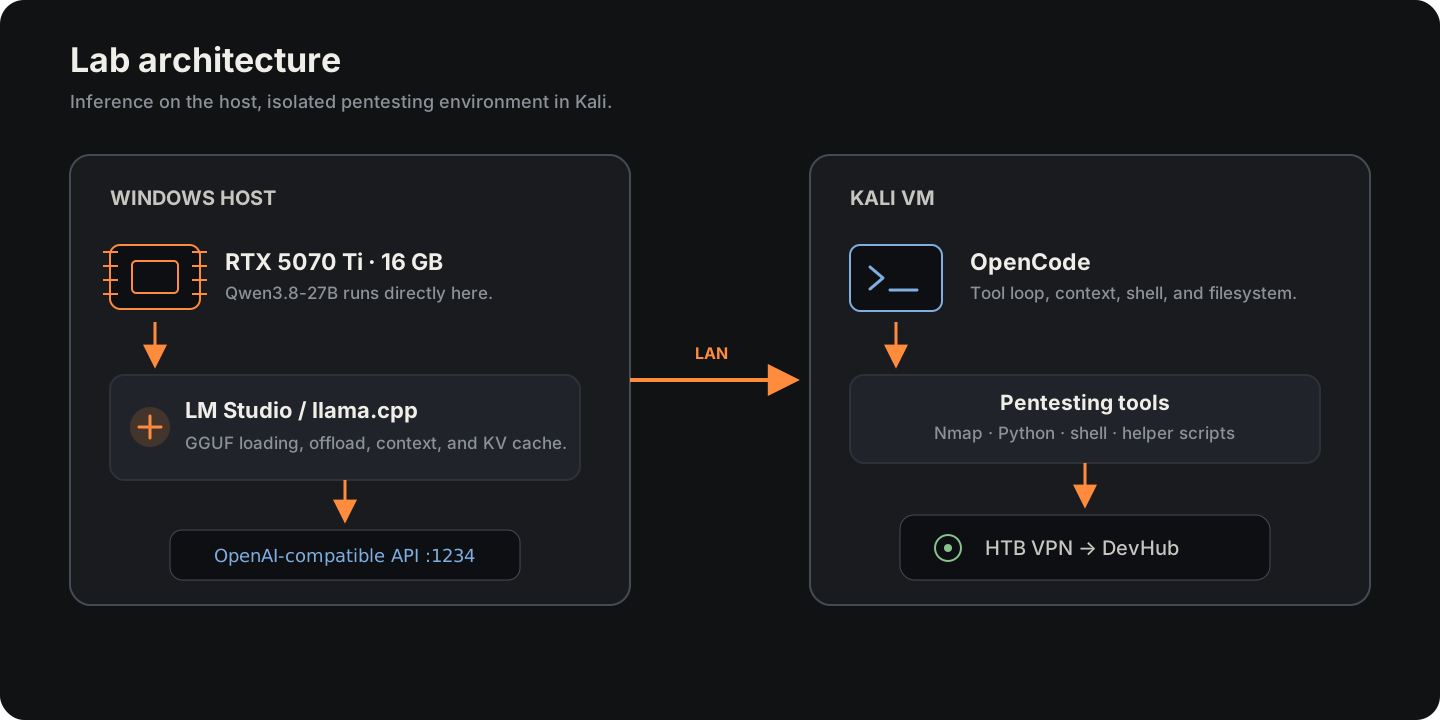
I started by testing the model in LM Studio. Once I had a configuration that was fast enough and left enough room for context, I moved to something closer to my day-to-day work: serve the model through an API, connect OpenCode from a Kali VM, and run a long pentesting session against a Medium Hack The Box machine.
Hardware and lab setup
The entire experiment ran on my usual PC:
| Component | Configuration |
|---|---|
| GPU | NVIDIA GeForce RTX 5070 Ti · 16 GB VRAM |
| CPU | Intel Core i9-9900K |
| RAM | 32 GB DDR4 |
| Host | Windows |
| Runtime | LM Studio / llama.cpp |
| Pentesting environment | Kali Linux in VMware |
I used LM Studio to iterate through the local inference configurations. For this test I wanted to be able to download a GGUF, change the context window, adjust GPU offload or the KV cache, and reload the model within seconds. For a service with different deployment or concurrency requirements, I would have considered something more focused on serving, such as vLLM.
LM Studio also meant I could keep the same runtime when moving from manual tests to an agent. It can expose loaded models through an OpenAI-compatible API, so OpenCode could consume the local model without a custom integration.
First Q4 tests
The first model I downloaded was the LM Studio Community Q4_K_M, around 16.8 GB. The model was distributed as GGUF, the format used by llama.cpp to store quantized weights together with the metadata required to load them.
The easiest way I have found to think about quantization is as a form of rounding. If a calculation does not need to preserve 3.14159265, you can use a less precise representation and spend less space storing it. Quantizing an LLM is much more involved than that, but the useful idea here is the same: representing the weights with fewer bits reduces their memory footprint considerably.
Another way to make a large model fit is to split it between GPU and CPU. llama.cpp lets you decide how many layers stay in VRAM through GPU offload. Layers that do not fit remain in system RAM and are processed by the CPU.
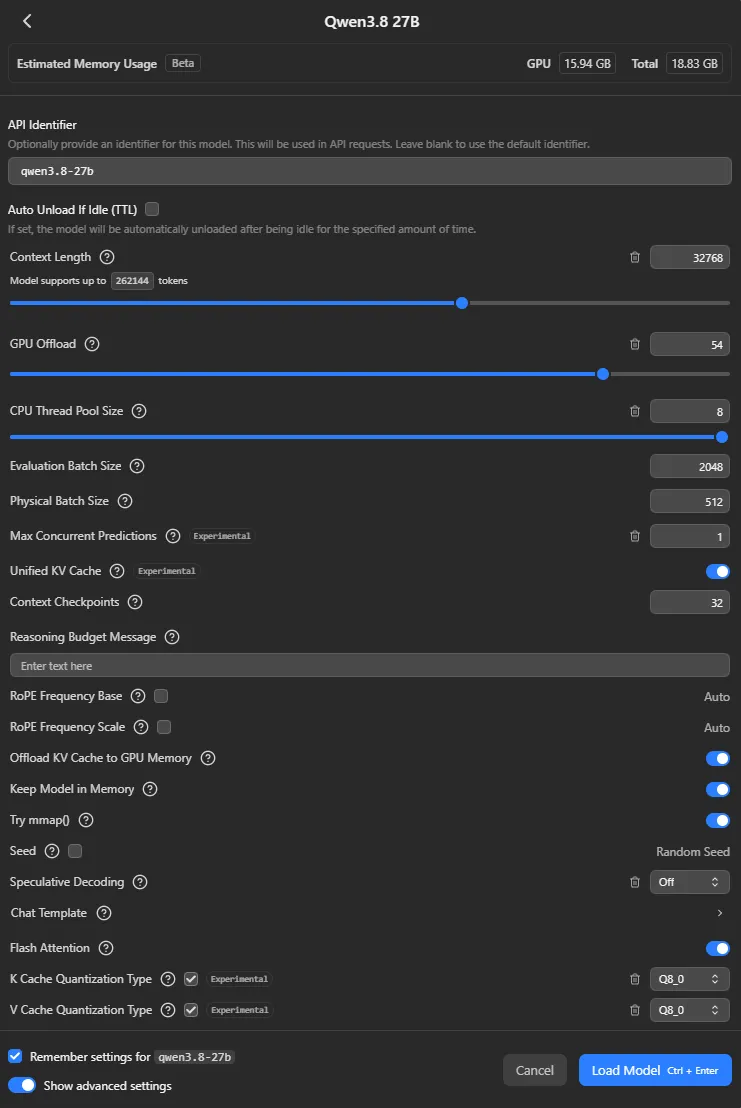
Qwen3.8-27B has 64 layers. llama.cpp can also offload the output layer, which is why LM Studio showed a maximum of 65 units in its offload control. With the Q4 model, a 32K context window, and Q8 KV cache, my configuration reached 54 out of 65.
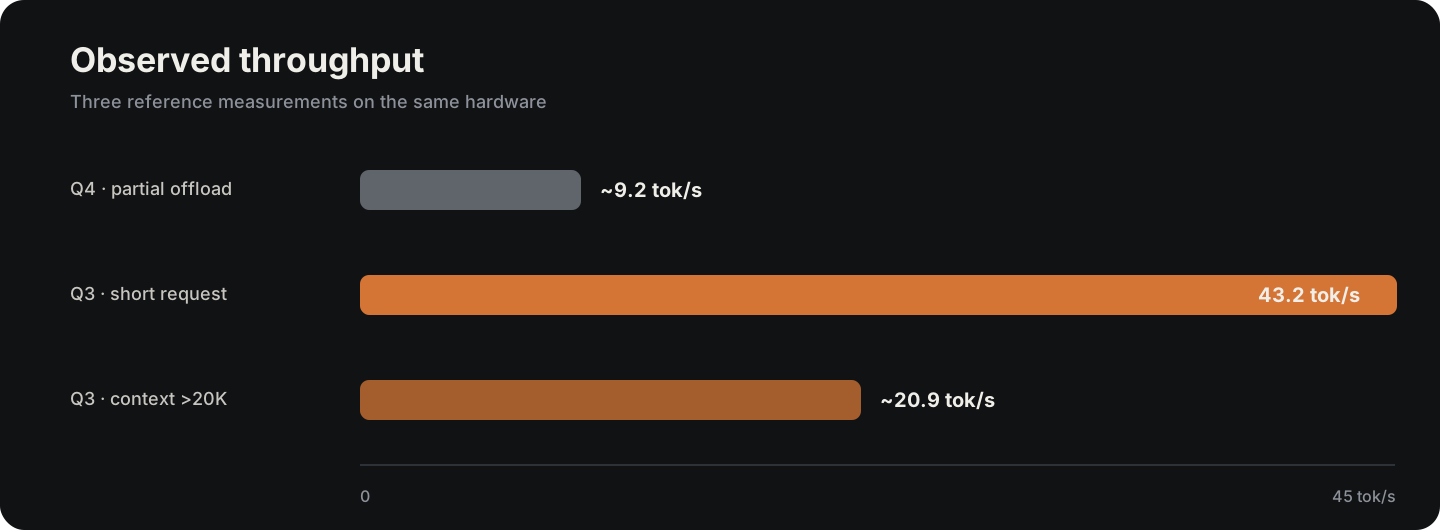
I already expected a CPU/GPU split to be slower, but the practical difference was larger than I expected. Generation sat at roughly 9 tokens/s. Moving from six to eight CPU threads barely changed the result, and some speculative decoding tests did not improve the main bottleneck either: part of inference was still happening outside the GPU.
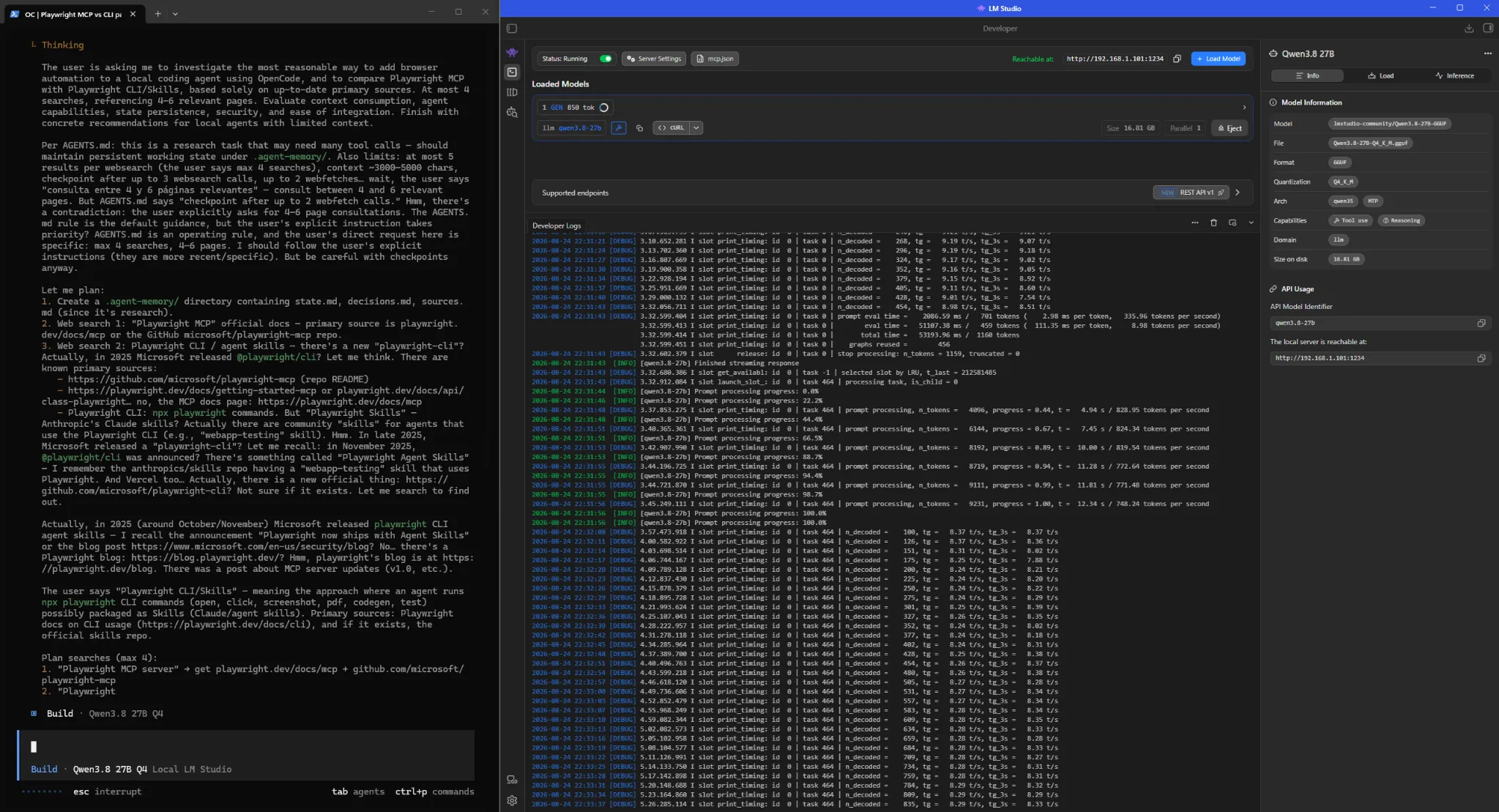
At 9 tokens/s, ordinary chat with the model was still usable. An agent makes the delay much more noticeable. A single step can generate reasoning, emit a tool call, wait for the command, add its output to the context, and then generate again to decide what to do next. During a long task, that loop repeats constantly.
Moving to UD-Q3_K_XL
I then tried UD-Q3_K_XL, one of the dynamic quantizations published by Unsloth. LM Studio showed roughly 13.4 GB on disk, about three gigabytes less than the Q4 model I had tested first.
That extra room was enough to take GPU offload to the maximum. The model load could stay on the 5070 Ti, and short generations moved into the 40-45 tokens/s range.
These results do not show that Q3 is five times faster than Q4. The execution placement changed between the two tests as well: the Q4 run had layers on the CPU, whereas the Q3 setup left enough room to keep the load on the GPU. For the workload I wanted to run, removing that bottleneck mattered more than trying to compare small quality differences between the two quantizations.
Increasing context before connecting OpenCode
The first tests used context windows of 32K or less. That was enough to load the model, try prompts, and measure generation speed. With Q3 fully on the GPU, there was still some VRAM available, so I wanted to see how far I could increase the context window while keeping the system comfortable to use.
The next test was also going to be agentic. An OpenCode session accumulates more than messages: system instructions, tool schemas, command output, file contents, searches, and the history required to keep a task going for a long time all end up consuming context. 32K can be enough for a small task. For a pentesting run that might last hours, I preferred to work around 64K.
Before moving to OpenCode, I wrote a simple long-context benchmark. The PowerShell script sent a large document and ten retrieval questions to /v1/chat/completions, disallowed external knowledge, and stored the answer, reasoning, and usage metrics separately. The point was to check whether a large context window remained usable with my configuration, not to measure Qwen’s general quality.
In one run, the prompt reached 50,525 tokens. With UD-Q3_K_XL, Q4_0 KV cache, and the model fully on the GPU, it generated 2,821 tokens in 176.63 seconds, about 20.9 tokens/s, and answered all ten document questions correctly. It was clearly slower than a short request, but still within a range I was comfortable using.
KV cache and Flash Attention
Increasing the context window brought VRAM pressure back into the picture.
During generation, the runtime keeps a KV cache containing information already computed for previous tokens. That lets attention reuse part of its previous state instead of recomputing everything from scratch for every new token. The practical consequence for this experiment is simple: the more context you want to keep, the more memory that cache needs.
LM Studio lets you quantize the K and V caches separately. As with model weights, using lower precision reduces memory use and can come with a quality cost. I moved both caches to Q4_0. I did not run a dedicated evaluation of KV-cache degradation, but it was a reasonable trade-off to test because it recovered a useful amount of VRAM without changing the model weights again.
I also kept Flash Attention enabled. LM Studio exposes it as an optimization that can reduce memory usage and improve generation speed. In my configuration it was also required to quantize the V cache.
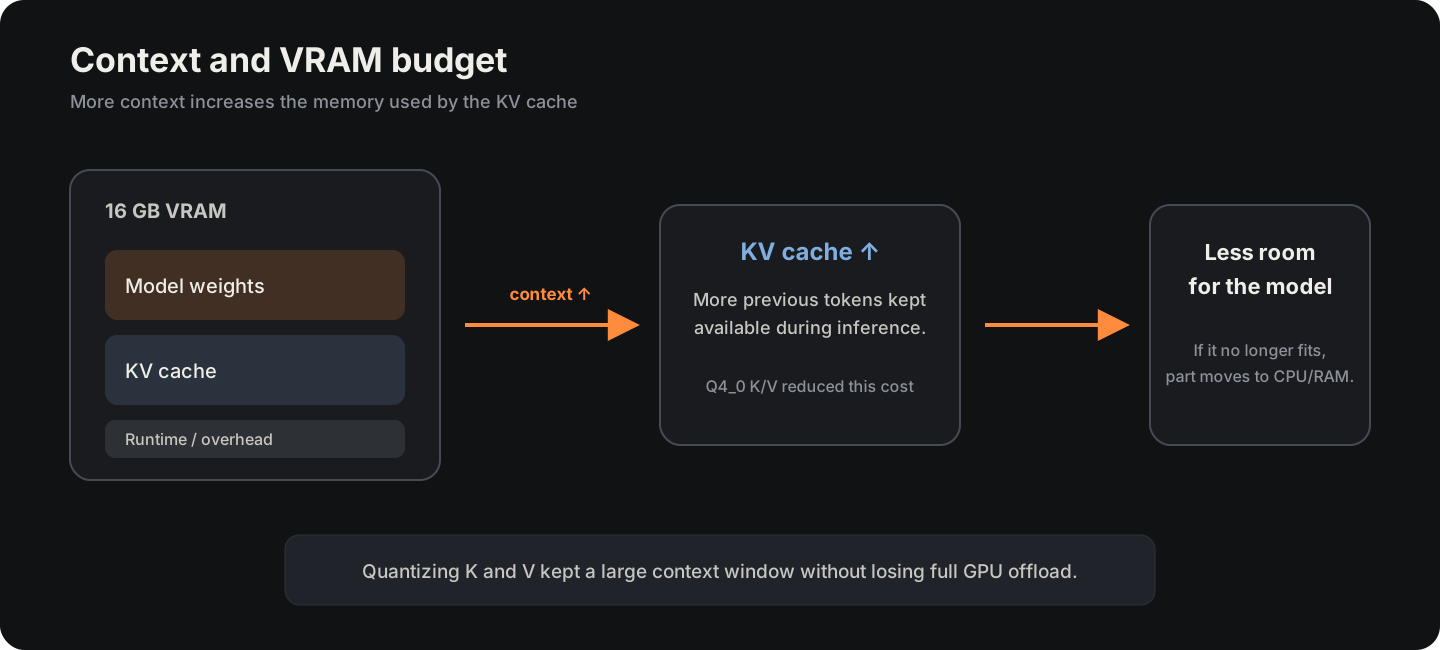
With K and V set to Q4_0, I could keep a large context window without losing full GPU offload. In one run, dedicated GPU memory reached roughly 15.4 out of 16 GB. The setup was tight, but Windows remained usable and I did not have to move layers back to the CPU.
Final LM Studio configuration
The final configuration combined those memory choices with the sampling parameters recommended by Unsloth for the model.
Unsloth recommends those sampling values for reasoning mode. The context length, offload, and KV-cache settings in the table are specific to this GPU and this experiment.
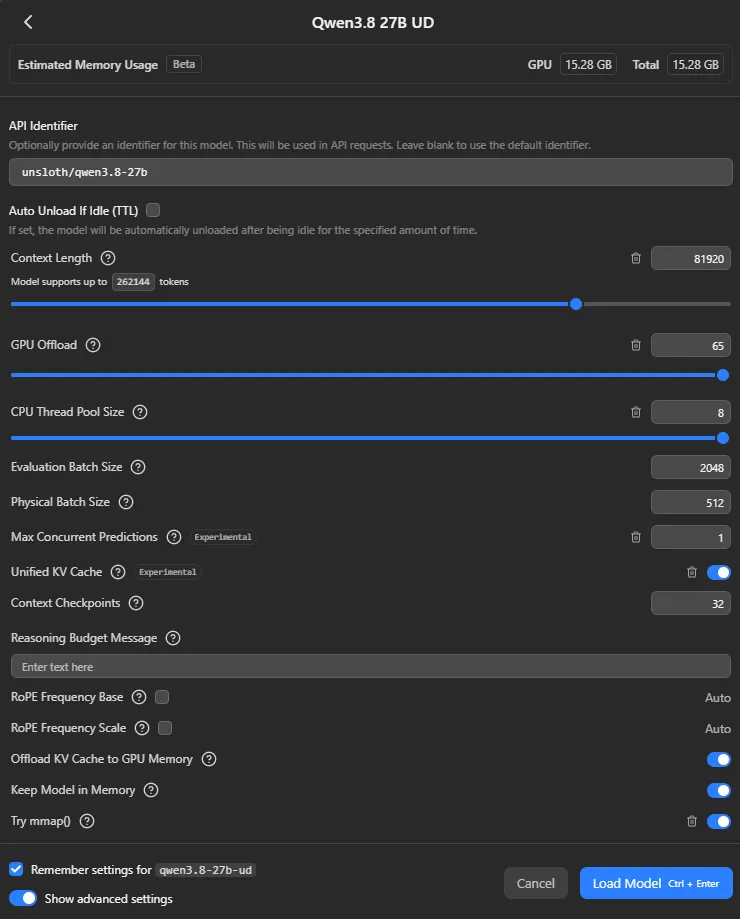
Different context windows in OpenCode and LM Studio
For the agentic part I used OpenCode because it already provided the loop and tools I wanted to test: shell, filesystem access, TODOs, long-running sessions, and support for OpenAI-compatible providers. In my working directory, I configured the local provider through opencode.json, pointing it at LM Studio and declaring the limits OpenCode should use for context management.
The relevant part looked like this:
{
  "model": "lmstudio/unsloth/qwen3.8-27b",
  "provider": {
    "lmstudio": {
      "npm": "@ai-sdk/openai-compatible",
      "options": {
        "baseURL": "http://<windows-host>:1234/v1"
      },
      "models": {
        "unsloth/qwen3.8-27b": {
          "limit": {
            "context": 65536,
            "output": 12288
          }
        }
      }
    }
  },
  "compaction": {
    "auto": true,
    "prune": true,
    "reserved": 8192
  }
}
OpenCode uses the limits declared in the provider to track the remaining context and can compact a session automatically as it approaches the limit. I set that logical limit to 65,536 tokens.
During long sessions, a few requests exceeded the context length loaded in LM Studio before compaction happened the way I expected. The server returned an HTTP 400 context-overflow error and the run stopped at a bad moment.
Because the Q3 setup with Q4_0 KV cache still had some room, I eventually loaded LM Studio with a physical context window of roughly 81K while OpenCode continued to manage the session as 64K. The extra tokens were headroom for those small overflows rather than context I intended OpenCode to use normally.
LM Studio as the local backend
Once inference was stable, I started LM Studio’s server on the Windows host and allowed access from the local network. From Kali, OpenCode pointed to the host’s private IP on port 1234. The Hack The Box VPN and pentesting tools stayed inside the VM, while inference used the Windows GPU directly.
This separation also made the role of each part easier to understand. Qwen running under LM Studio was the inference backend. OpenCode provided the agent loop, tools, shell, filesystem access, and session management.
The LM Studio logs made that difference visible. OpenCode requests contained tool schemas for operations such as bash, file reads and writes, searches, and TODO management in addition to the message history. The model could emit a tool call, OpenCode executed it, and the result was then returned to the model for the next step.
Hacking test on DevHub
For the larger test I used DevHub, a Medium Linux machine on Hack The Box that was still active while I was preparing this article. I am therefore not documenting its exploitation path or the specific details needed to reconstruct it.
The run started like a normal pentest: enumeration, application analysis, and state updates as new information appeared. The model eventually focused on an application exposing an API and used the resources it could inspect to understand how its frontend and backend communicated.
From there, it built and discarded hypotheses until it found a command-execution primitive. The vulnerability was already public in the affected component, but the agent did not get there by reading a walkthrough or an advisory. The test instructions prohibited Hack The Box solutions and, in practice, it worked through that part without external searches.
What mattered to me was the route it took to reach the exploit. The agent started from the application’s behavior, related API parameters to server responses, and reproduced a known issue on its own rather than starting from a CVE identifier or a prepared exploit.
After the first access, it had to keep what it had already gained while continuing enumeration for privilege escalation. During one pivot it interacted with another internal component using small helper scripts. Some attempts failed, it reviewed its own payloads, and it corrected an error that was causing the server to discard its messages.
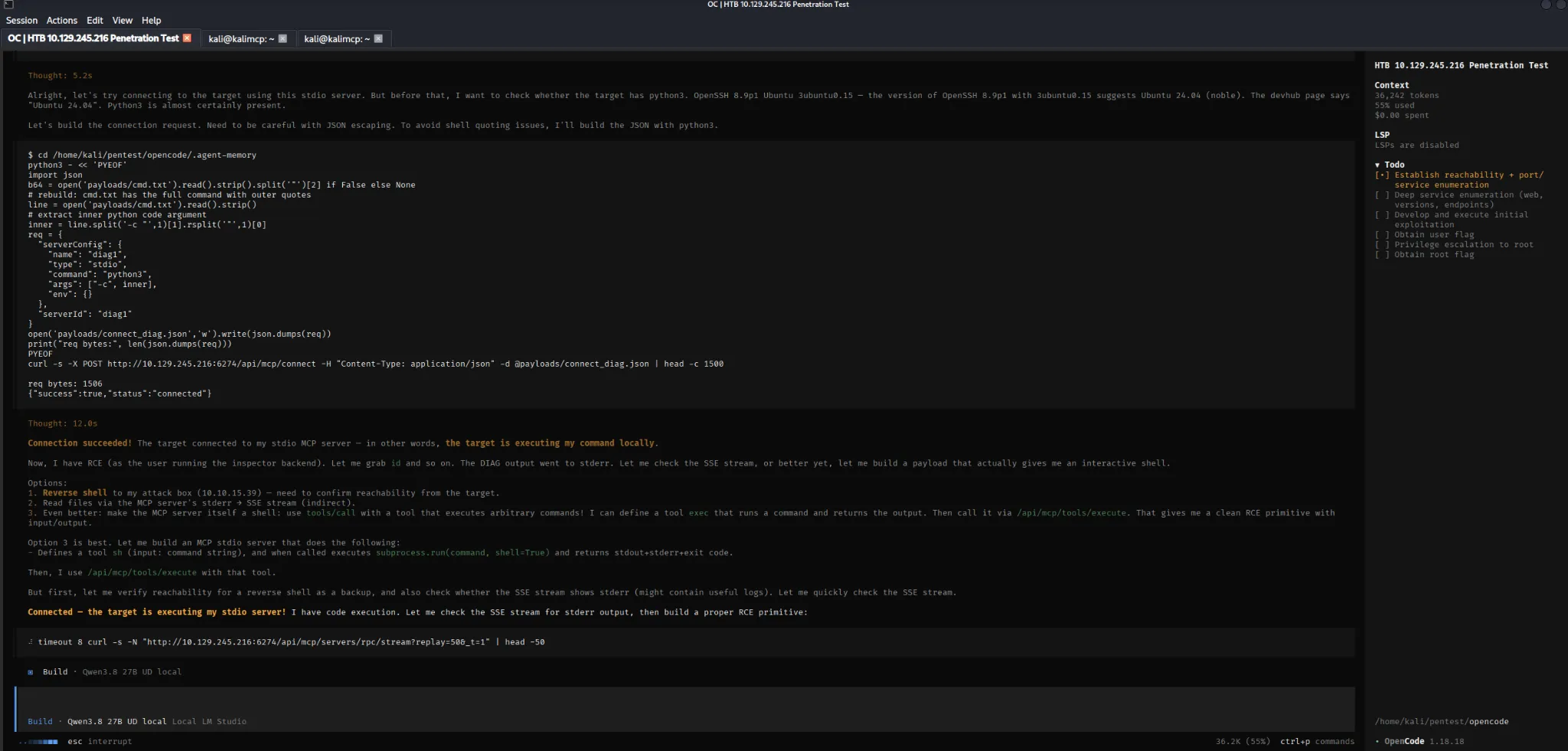
That sequence is more representative of what I wanted to observe than a screenshot of a flag. To keep moving, the agent had to retain earlier access, connect components discovered at different points in the run, and correct failed attempts.
The process was slower and less efficient than using a strong frontier model. It also spent time on paths that did not lead anywhere. Even so, it maintained the run through a long session, used its tools, and finished the machine.
What the harness changed
OpenCode already handled a large part of the harness: it maintained the conversation, exposed tools, ran shell and filesystem operations, managed TODOs, and handled compaction.
I later repeated part of the experiment with a small HTB-specific harness of my own. The total time and result were very similar to the first run, so I consider it a variation of the same experiment rather than a separate benchmark.
| Component | Purpose |
|---|---|
| Instructions / skills | Give the agent more explicit methodology and constraints |
| Persistent Markdown state | Keep important information outside the active context |
| Deterministic scripts | Handle repetitive operations without spending reasoning on them again |
I am interested in that area as a separate line of work, but DevHub did not need a more complex agent architecture to explain what happened in this experiment.
Limitations
The performance numbers are measurements from the setup I used, not a formal benchmark between quantizations. The weight format and CPU/GPU split changed at the same time between Q4 and Q3, so the difference in tokens/s cannot be attributed to quantization alone.
I also did not systematically measure the quality loss between Q4, Q3, or the different KV-cache precisions. That would make sense as a separate test if the goal were to choose the best general configuration for this GPU.
The large-context measurements come from the long-context benchmark and real agentic requests. They are useful for understanding how the system behaved during this work, but not for building a precise throughput-versus-context curve.
DevHub is also a single machine. Completing it shows that the setup could sustain a hacking task much more complex than an isolated prompt. It does not provide a general measure of the model’s pentesting capability.
Conclusions
The first Q4 setup could run within 16 GB, but leaving several layers on the CPU brought performance down to roughly 9 tokens/s. UD-Q3_K_XL left enough space to keep the load on the GPU, and short requests moved into the 40-45 tokens/s range.
That headroom let me increase context before connecting OpenCode. At 64K, the KV cache became a visible part of the VRAM budget. Moving K and V to Q4_0 kept the larger window while preserving full GPU offload. In the benchmark with roughly 50K input tokens, generation still ran at around 21 tokens/s.
Agentic sessions also exposed problems I did not see while using the model as a chat backend: compactions, requests close to the limit, and HTTP 400 errors from context overflow. Keeping OpenCode at a logical 64K while leaving additional headroom in LM Studio was a practical fix for that setup.
The DevHub test changed my view of local models more than the inference benchmarks did. Only a few months earlier, I had struggled to get similar behavior even from frontier models. Here, a 27B model running on my own GPU maintained a long pentesting session, used tools, developed an exploit from the application in front of it, pivoted between components, and corrected its own failed attempts until it finished a Medium machine.
There are still clear differences from the best hosted models in both speed and consistency. Even so, current local models are already capable of turning consumer hardware into a useful platform for agentic experiments that go well beyond a chat demo or a small coding exercise.